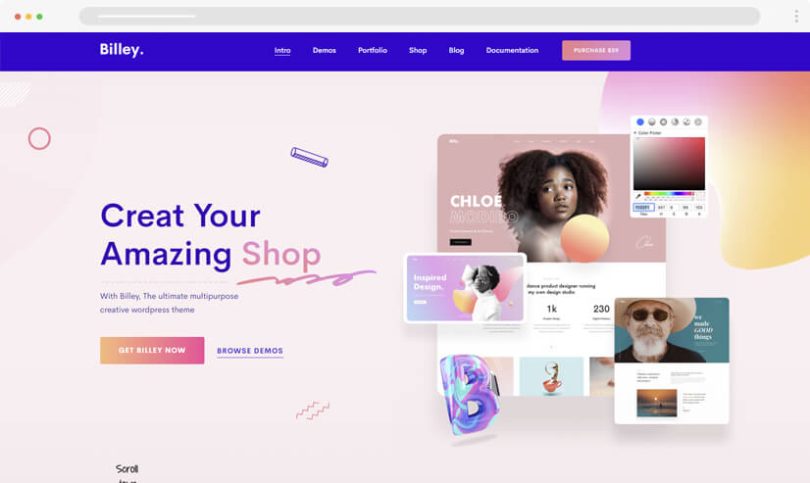

If you’re looking for simple website design ideas, you’re likely aiming to build a website that looks clean, professional, and easy to navigate without overcomplicating things. The truth is, simplicity in web design is not about doing less—it’s about doing the right things in a clear and intentional way. A simple design improves usability, speeds up your website, and helps visitors focus on what truly matters.
In this detailed guide, I’ll walk you through practical, beginner-friendly simple website design ideas and explain how you can apply them step by step to create an effective website.
Understanding the Importance of Simple Website Design
Before diving into design techniques, it’s important to understand why simplicity matters so much.
A simple website:
- Reduces confusion for users
- Loads faster on all devices
- Looks more professional and trustworthy
- Improves user engagement
- Helps guide visitors toward your goals (sales, sign-ups, contact, etc.)
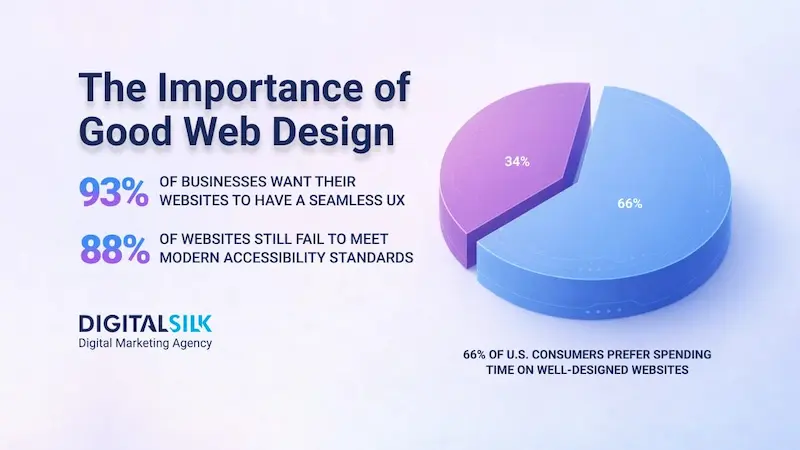
When users land on a cluttered website, they often leave quickly. But when they land on a clean and organized site, they are more likely to stay, explore, and take action.
1. Start with a Minimal Layout Structure
One of the most important simple website design ideas is to begin with a minimal layout.
Instead of filling your pages with too many sections or elements, focus on:
- A clear header
- A simple hero section
- Essential content sections
- A footer
Avoid unnecessary components that don’t serve a purpose. Each section should have a clear goal.
Tip:
Think of your website like a guided path. Every element should help users move forward, not distract them.
2. Keep Your Color Scheme Simple and Consistent
Color plays a major role in design, but using too many colors can overwhelm users.
A simple approach is:
- Choose one primary color
- Choose one secondary color
- Add one accent color for highlights or buttons
Consistency is key. Use the same colors throughout your website to create a unified look.
Why this matters:
A limited color palette makes your website appear more organized and visually appealing.
3. Focus on Readable Typography
Typography is often overlooked, but it’s critical for user experience.
When choosing fonts:
- Use no more than 2 font families
- Select clean, modern fonts
- Maintain proper spacing between lines and paragraphs
- Ensure text is large enough to read comfortably
Avoid decorative or overly stylized fonts for body text. Simplicity improves readability and keeps users engaged.
You may also like it:
Modern Graphic Design Ideas For Beginners and Experts
Top Logo Design Tools Review: Best Logo Makers For 2026
Basic Design Principles Explained Simply for Beginners Guide
Cheap Graphic Design Tools Deals: Top Picks for Designers
4. Create Clear and Simple Navigation
Navigation is one of the most important elements of a website.
A simple navigation menu should:
- Include only essential pages
- Use clear and descriptive labels
- Be placed in a familiar location (usually top of the page)
- Avoid unnecessary dropdown complexity
Examples of basic navigation items:
- Home
- About
- Services
- Blog
- Contact
The goal is to make it easy for users to find what they need without thinking too much.
5. Design with Mobile Users in Mind
Today, a large percentage of users browse websites on mobile devices. That’s why responsive design is essential.
To ensure mobile-friendliness:
- Use flexible layouts that adjust to screen size
- Keep buttons large enough to tap easily
- Avoid overcrowding content
- Test your website on different devices
A simple design naturally adapts better to mobile screens, making it easier to maintain consistency across devices.
6. Use White Space Effectively
White space (also called negative space) is the empty space between elements.
It helps:
- Improve readability
- Reduce visual clutter
- Highlight important content
- Create a balanced layout
Don’t feel the need to fill every inch of your website. Leaving space between sections makes your design cleaner and more professional.
7. Limit the Number of Elements on Each Page
Another important principle of simple website design ideas is to avoid overcrowding.
Each page should focus on one main purpose. For example:
- A homepage introduces your brand
- A services page explains what you offer
- A contact page provides ways to reach you
Avoid adding too many images, buttons, or sections on a single page. Simplicity improves clarity.
8. Use High-Quality but Minimal Images
Images enhance visual appeal, but too many can slow down your website and create clutter.
Best practices:
- Use only relevant images
- Choose high-quality visuals
- Optimize image size for faster loading
- Avoid unnecessary stock images
A few meaningful images are more effective than many random ones.
9. Keep Your Call-to-Action (CTA) Clear
Every website should guide users toward an action.
Examples of CTAs:
- “Get Started”
- “Contact Us”
- “Sign Up”
- “Learn More”
Make your CTA:
- Visible
- Easy to understand
- Consistent across pages
A simple design ensures your CTA stands out without distractions.
10. Maintain Consistency Across the Website
Consistency builds trust and improves user experience.
Make sure to maintain:
- Consistent fonts
- Consistent colors
- Consistent button styles
- Consistent spacing and alignment
When everything looks uniform, your website feels more polished and reliable.
11. Avoid Unnecessary Animations and Effects
Animations can enhance a website, but overusing them can reduce performance and distract users.
Use animations only when:
- They improve user experience
- They are subtle and smooth
- They do not slow down the site
A simple website focuses on functionality first, not flashy effects.
12. Structure Your Content for Easy Reading
Content should be easy to scan and understand.
You can achieve this by:
- Using headings and subheadings
- Breaking content into short paragraphs
- Using bullet points for lists
- Highlighting key information
Most users don’t read word-by-word—they scan. A well-structured layout helps them find information quickly.
13. Keep Forms Short and Simple
If your website includes forms (contact forms, sign-ups, etc.), keep them minimal.
- Ask only for essential information
- Avoid unnecessary fields
- Use clear labels and instructions
Short forms reduce friction and increase the likelihood of user completion.
14. Focus on Website Speed and Performance
Speed is a critical part of simplicity.
To improve performance:
- Compress images
- Avoid heavy scripts
- Limit third-party plugins
- Use clean code structure
A fast-loading website improves user satisfaction and helps retain visitors.
15. Test and Improve Continuously
Simple design is not a one-time task. You should regularly test your website.
- Check how users interact with your site
- Identify confusing elements
- Simplify where needed
- Gather feedback
Continuous improvement ensures your website remains effective and user-friendly.
Final Thoughts
Applying these simple website design ideas can help you create a website that is clean, functional, and user-focused. Simplicity is not about limiting creativity—it’s about removing unnecessary complexity so your message stands out clearly.
When you focus on minimal layouts, consistent colors, readable typography, clear navigation, and fast performance, you build a website that not only looks good but also delivers a smooth and enjoyable experience for your visitors.
A simple website is easier to maintain, easier to navigate, and often more successful in achieving its purpose.
FAQs on Simple Website Design Ideas
1. What are simple website design ideas?
Simple website design ideas focus on clean layouts, minimal elements, easy navigation, and a user-friendly interface that avoids unnecessary complexity.
2. Why should I choose a simple website design?
A simple design improves user experience, loads faster, works better on mobile devices, and helps visitors find information quickly without confusion.
3. Is simple website design good for SEO?
Yes, simple websites usually perform better in SEO because they load faster, have better structure, and provide a smoother user experience, all of which search engines prefer.
4. How many colors should a simple website have?
Ideally, a simple website should use 2–3 main colors to maintain consistency and avoid a cluttered appearance.
5. Can I still make my website look modern with a simple design?
Absolutely. A simple design can still look modern by using clean typography, proper spacing, high-quality visuals, and a well-organized layout.